One character wrong, and we offered to spend your AI budget on it
A user wrote => where they meant >=. What our app told them was to write a simpler query, and then it offered to spend their AI budget translating a statement no model can read. Here is what it says now, and why the difference is bigger than a better error message.
The query was ordinary. Find the messages sent to one number since a date:
select * from smsOut
where destination = '+254758475680'
and sendDate => '2025-09-10 00:00:00'
One character wrong, in the middle of a line. The collection was right, the data was there, and the person writing it was sure of both, which is exactly why they went looking for a bug in the product rather than in the line.
Why a MongoDB connection is the hard case
On a Postgres or MySQL connection this never comes up. Your SQL goes to the database, the database refuses it, and the refusal names the character. The database is the authority on its own dialect and we do not get in the way of that.
A document database has no such authority. SnoutData lets you write SQL against MongoDB by compiling it, in the app, into an aggregation pipeline. Nothing downstream ever reads your SQL, so nothing downstream can tell you it is wrong. Whatever the app says about that statement is the only thing that will ever be said about it.
One wrong classification, three wrong answers
Internally the compiler had two ways to refuse a query, and they mean different things. This is wrong for this connection, such as a collection that does not exist, is final: nobody can fix it for you. This is valid SQL we cannot express, such as a UNION, is not final, because the assistant can often write the pipeline by hand.
A statement that did not parse was being filed under the second one. That single misfiling produced all three of the things the user saw. The answer ended with "try a simpler SELECT/WHERE/LIMIT", which is advice about a query that is too ambitious, not about a typo. The parser's position was thrown away on the way out, so nothing said where. And because the second kind is the kind a model might rescue, the app offered to spend real money translating a statement that is not SQL. The model, predictably, returned nothing.
So the fix is not a nicer string. It is a third kind of refusal: this is not SQL. Final, like the first, and it carries the position.
What it says now
Syntax error at line 3, column 14: "=>" is not a SQL comparison. Did you mean ">="?
And it says it before you run anything. The editor underlines the two characters, and the message sits on them:
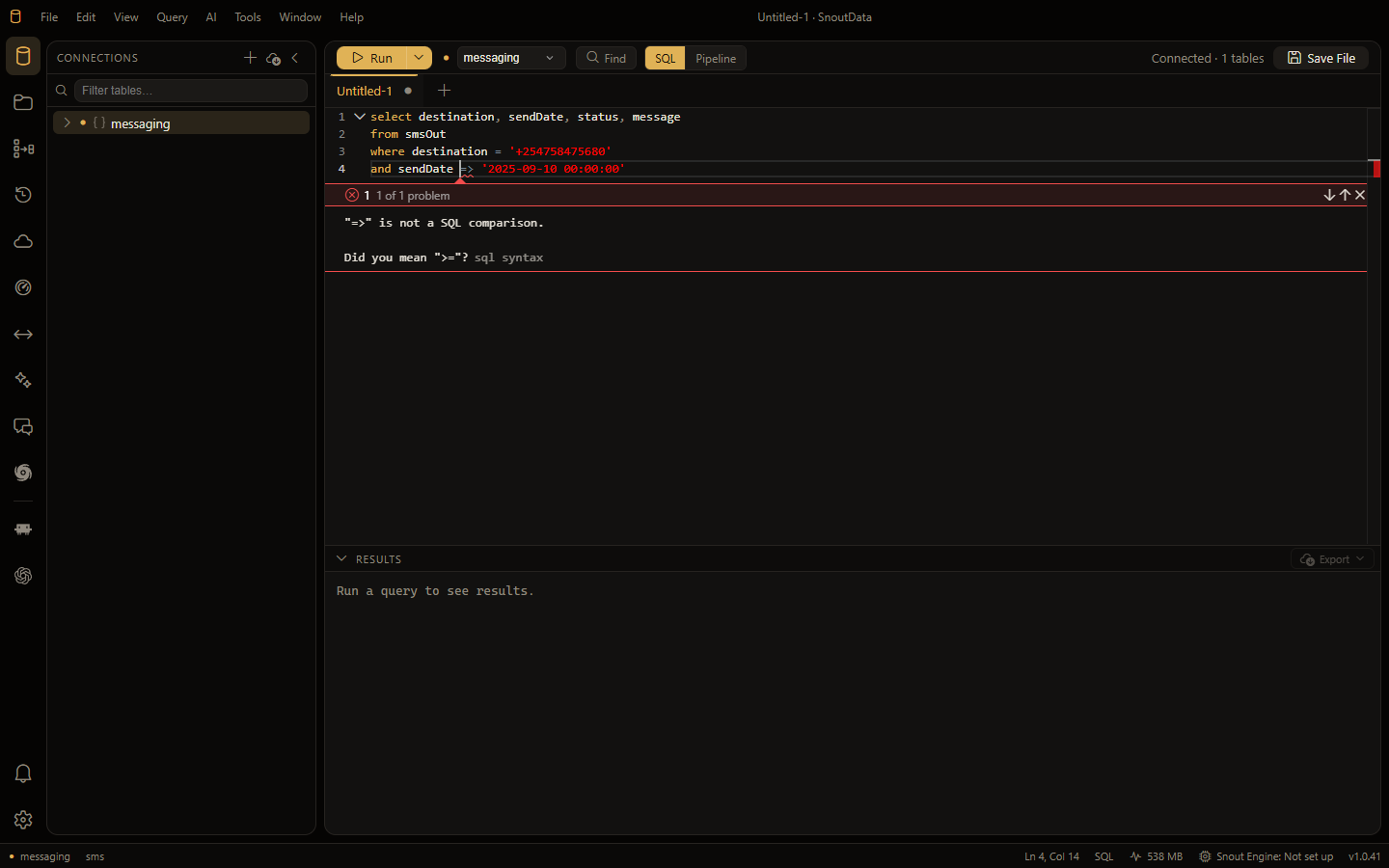
The suggestions cover the mistakes people actually make, which are mostly habits carried in from another dialect: =< and == and !<, SQL Server's TOP 10, MySQL's LIMIT 10, 20 and its # comments, a trailing comma before FROM, a quote that is never closed. Anything else that fails to parse still gets its line and column, which is the minimum you need.
A statement you are halfway through typing is not underlined. Half a query fails to parse at every keystroke, and an editor that reacts to that is an editor with a red line under your fingers all day. Only a mistake the checker recognises is marked while you type.
The one that is worse than an error
where destination = "+254758475680"
That parses. In standard SQL a double-quoted name is a column, not text, so the statement runs, compares one field against another field's name, and returns nothing at all. No error, no clue, and the same feeling as before: the data is there, and the app is lying to you. It is a warning now, with the single-quoted version to use instead.
Nothing here asks a model
The check is the same parser the compiler already ran, on your machine, on the text in your editor. It costs nothing, works offline, and is finished before you could have typed the next character. The notable part is not that we added AI to this. It is that we took it out: the app used to offer a model for this, and offering a model for a one-character typo was the bug.